Lead Management
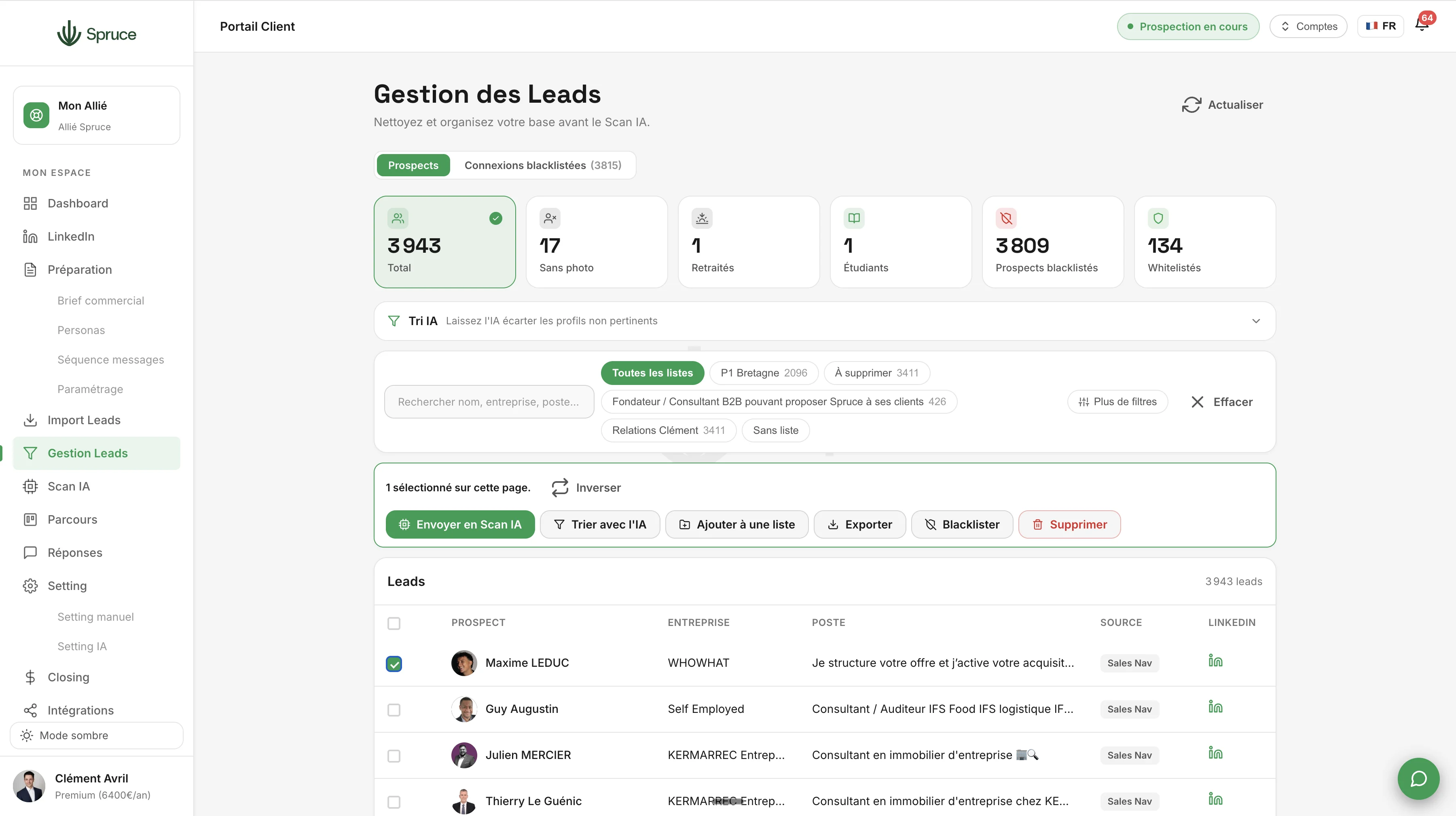
Prepare your lists before prospecting. Create segments, request a first AI pass, then filter in bulk: no photo, retired, students. Remove irrelevant prospects before launching AI Scan.
Once your prospects are imported, they land in Lead Management: your control room before launching prospecting. You can create segments and filter in bulk (no photo, retired, students...) to keep only what matches your target.
To go further, an optional AI pass is available (e.g., "Keep only B2B consultants"). At this stage, the info is limited to the LinkedIn description: the goal is just to remove the obvious noise before AI Scan.
You can also blacklist or whitelist prospects. But the real work happens upstream: during Prospecting Setup, by detailing your personas (competitors, existing clients...), you're already giving Spruce what it needs to automatically disqualify the wrong profiles.
Lead Management therefore remains an optional step, mainly useful for staying organized: even if it's imperfect, AI Scan catches the mistakes afterward. What really matters is the precision of your Prospecting Setup.
Once your lists are ready, send your prospects to AI Scan: everything becomes automatic until the prospect replies. At Spruce, no campaigns: we prospect in a continuous flow, one prospect at a time.
Lead Management is the manual sorting stage before prospecting: segmentation, bulk filtering (no photo, retired, students), blacklist/whitelist, and an optional AI pass to remove obvious noise. AI Scan is the next step: the AI scrapes the prospect's entire LinkedIn profile, then cross-references it with everything you described during Prospecting Setup (your sales brief and persona details) to assign a confidence score and qualify or disqualify the prospect.
Yes and no. If you send 30 prospects from a list of 100, the list stays active with the remaining 70, and you can still edit it. The 30 you sent disappear from Lead Management and continue their automatic journey through to the sale. A prospect doesn't come back once it has entered AI Scan.
Yes, there's a monthly limit since each AI sort consumes a significant amount of tokens. It's like exporting your entire list, having an AI model sort it, and re-importing it.
Yes, but only while it's still waiting in the AI Scan queue, before being qualified or disqualified. Once qualified or disqualified, it continues its automatic journey through to the sale.
Question template
Réponse template.
Rejoignez 150+ clients qui prospectent intelligemment avec Spruce.
Plan Essentiel offert pendant 14 jours résiliable à tout moment